
The Technical Guide to SIS-Ready Student ID Photo workflow - Cropping, Resizing and Metadata Standards
The Operational Stakes of School Information System Integration
Every autumn, school photography studios face a high-stakes race against the academic calendar. The modern Student ID Photo workflow is far more than a creative endeavor: it serves as a critical technical bridge connecting high-volume photography studios directly to complex school administration systems. When a studio delivers thousands of student portraits, the school expects these digital files to integrate seamlessly into their daily operations on day one.
Yet, even minor technical discrepancies can halt this process. Mismatched photo formats and incorrect dimensions instantly trigger database upload errors, resulting in delayed ID badge printing and frustrating administrative bottlenecks for school staff. Instead of enjoying automated efficiency, school IT administrators are left troubleshooting file errors one by one.
Modern School Information Systems, or SIS, require absolute uniformity to map student faces to digital profiles automatically. For these databases to function across attendance registers, library systems, and campus security portals, every image must comply with strict formatting rules. Delivering flawless, SIS-ready photos is no longer just a value-add service: it is the baseline standard for studios looking to secure and retain lucrative school district contracts.Implementing a structured Student ID Photo workflow is the only way to ensure thousands of images are processed without errors.
Mastering Bulk ID Cropping: Headroom and Aspect Ratio Standards
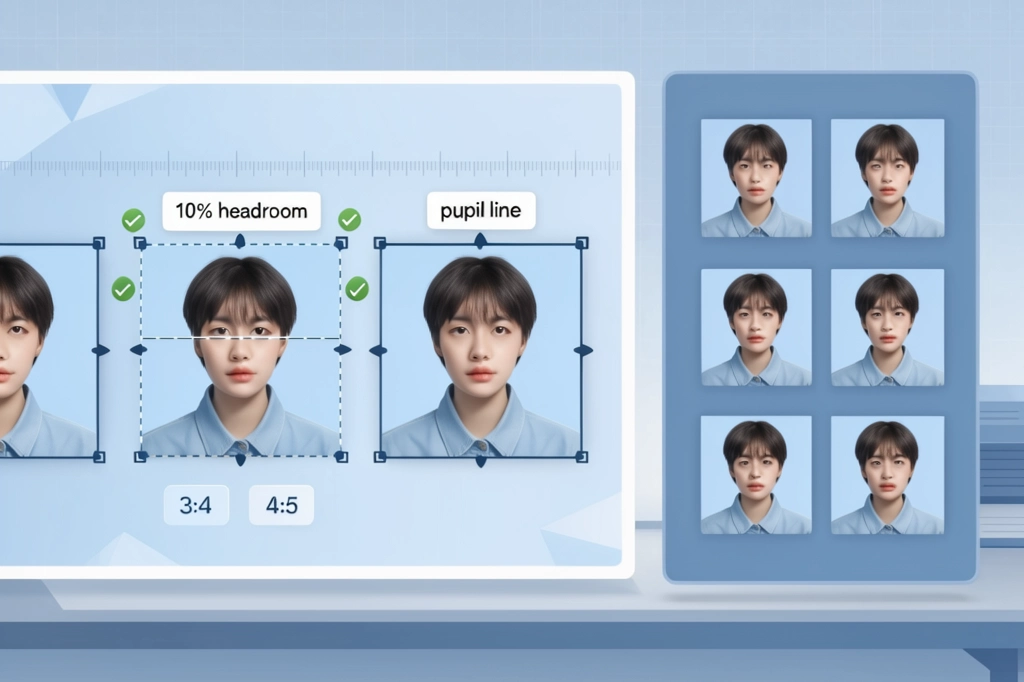
Inconsistent headroom and poor eye-line alignment present immediate challenges when student portraits are uploaded to database portals. Many administrative systems display images in circular crop-outs or tight square frames. If the initial alignment is off by even a few pixels, the student's chin or forehead can easily be clipped out of the frame entirely. To maintain visual consistency across an entire school directory, your Student ID Photo workflow must apply a strict geometric approach to bulk ID cropping.
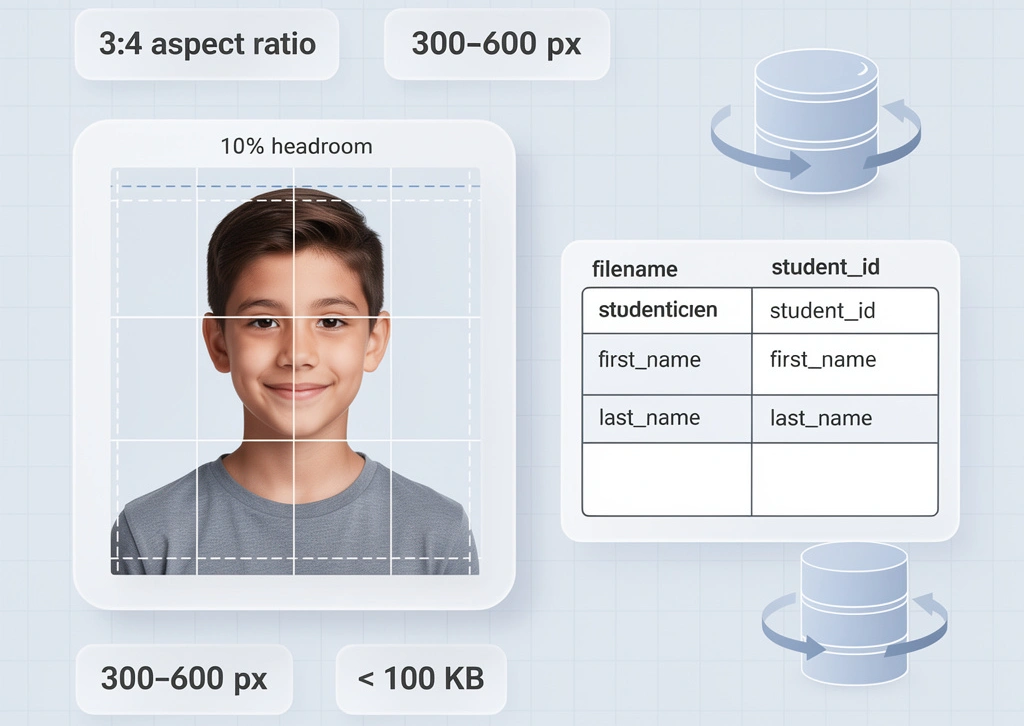
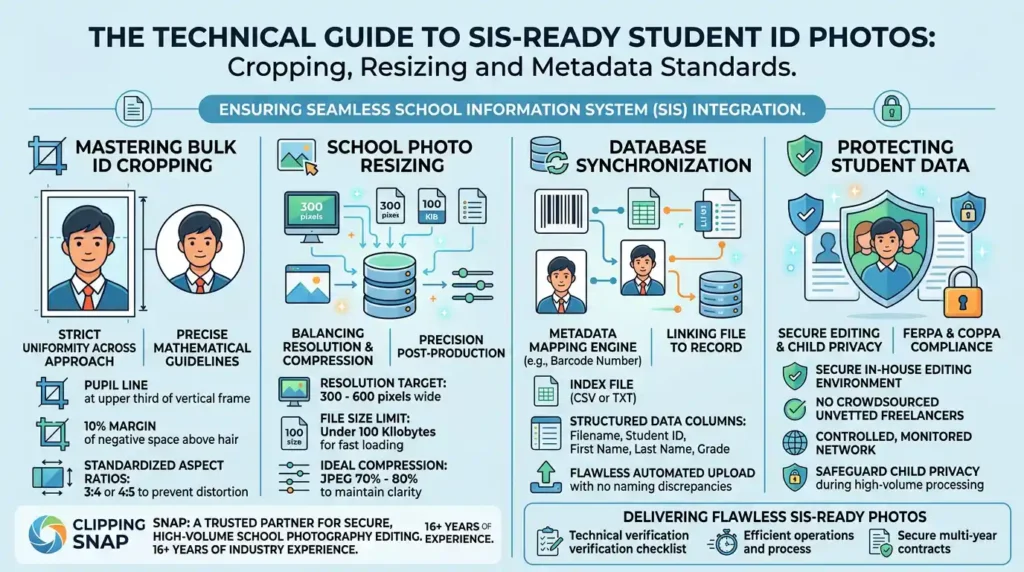
Achieving uniform results across thousands of diverse student files requires precise mathematical guidelines. Automating or executing this crop successfully means positioning the pupil line exactly at the upper third line of the vertical frame. This placement must be paired with a consistent ten percent margin of negative space above the hair, ensuring that taller hairstyles do not hit the top border of the digital card.
Aspect ratios are equally critical to prevent the administrative software from distorting the subject. Most school information systems utilize either a three to four or a four to five aspect ratio. Delivering files in any other format, such as a standard digital portrait ratio of two to three, often forces the database to squeeze the image vertically to fit its designated container. Sticking to these two standardized proportions guarantees that every SIS-ready photo renders with natural facial proportions.
School Photo Resizing: Balancing Resolution and Compression
Getting the dimensions right during post-production is a delicate balancing act for any high-volume studio director. Precision school photo resizing requires targeting a specific resolution sweet spot, typically between 300 and 600 pixels wide. While high-resolution source files are necessary for yearbook print, they quickly overwhelm local school databases and cloud portals. Keeping individual file sizes under 100 kilobytes is the industry benchmark. This limit ensures fast loading times across school servers, which often support thousands of simultaneous administrative queries on limited bandwidth.
To meet these strict size constraints without sacrificing visual clarity, you must carefully manage JPEG compression levels. A compression setting between 70% and 80% represents the ideal technical compromise. This range successfully minimizes file weight while keeping crucial facial features sharp enough for physical security badges, bus passes, and high-contrast digital displays. Striking this balance ensures that school administrators see crisp, recognizable student faces without experiencing database lag during morning check-ins or system-wide updates.
Database Synchronization: File Naming and Metadata Mapping
A seamless Student ID Photo workflow relies heavily on how well your image filenames match your database records. The true engine of a seamless Student ID Photo workflow is metadata mapping. Without this digital link, even perfectly cropped images remain useless to a school administration. Metadata mapping connects the physical image file directly to the corresponding student record using a unique identifier, which is typically the student database key or barcode number.
To execute this process, studios must deliver a structured index file, usually formatted as a comma-separated values (CSV) or tab-delimited TXT document. This index file acts as a translation map for the school database. A standard structure features columns for the exact filename, Student ID number, first name, last name, and grade level. For example, a row might read: 123456.jpg,123456,Jane,Doe,10.
Even minor discrepancies can corrupt a bulk SIS import and halt operations. Mismatched naming conventions, such as using spaces or special characters in filenames instead of hyphens or underscores, frequently cause import failures. Furthermore, double-byte characters or curly quotation marks in the index text can break database parsers entirely. Ensuring that image filenames exactly match the unique identifier field in your CSV file is the only way to guarantee a flawless, automated upload.
Protecting Student Data: Secure Editing and Child Privacy
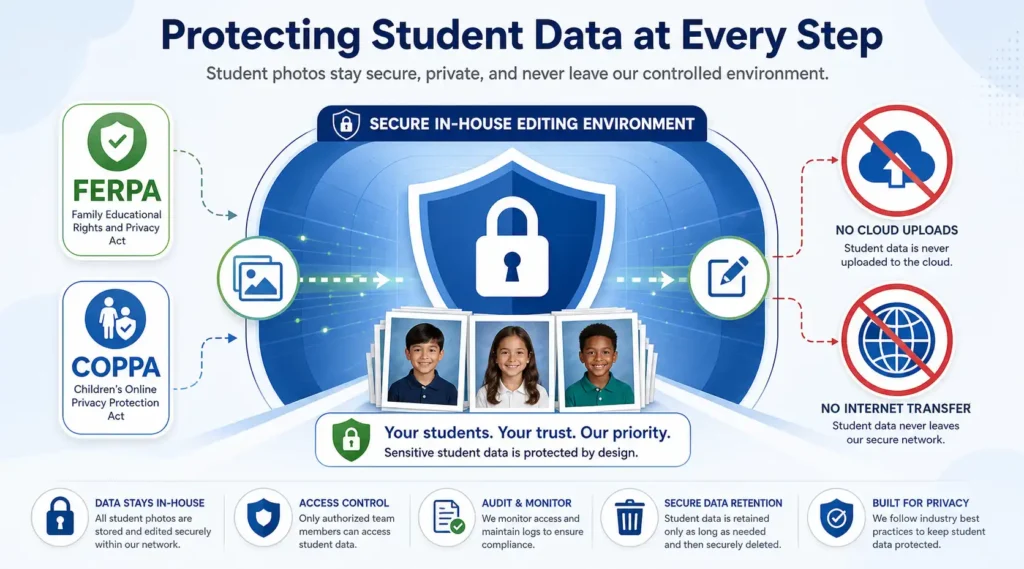
Handling student images alongside personally identifiable information requires strict adherence to privacy regulations such as FERPA and COPPA. Because the Student ID Photo workflow links physical faces directly to unique database records, data security cannot be an afterthought. School districts demand absolute data protection, which means photography studios must guarantee that their post-production pipeline is entirely secure.
Clipping Snap addresses these stringent requirements by maintaining a one hundred percent in-house, secure editing environment. Unlike platforms that crowdsource editing to unvetted freelancers, Clipping Snap guarantees that sensitive child data never leaves a controlled, monitored network. This disciplined infrastructure protects child privacy at every stage of the high-volume rendering and cropping process.
With over sixteen years of industry experience, Clipping Snap understands the unique compliance pressures facing modern school studios. Outsourcing to an established partner ensures that your images are processed safely, accurately, and in accordance with modern cybersecurity standards. Studios looking to safeguard their data while scaling seasonal production can rely on professional school photography editing services to deliver secure, high-volume processing that satisfies both school boards and parents alike.
💡 Pro Tip: Explore our specialized school photography editing services to see how we handle high-volume technical workflows with 100% precision.
A Checklist for Delivering Flawless SIS-Ready Photos
The Technical Verification Checklist
To guarantee your images integrate seamlessly on upload day, run every batch through a strict quality assurance checklist. Verify that your bulk ID cropping adheres to a uniform aspect ratio with consistent headroom and eye-line placement. Confirm that school photo resizing has locked the dimensions between 300 and 600 pixels wide while keeping file weights under 100 KB. Finally, double-check that your metadata mapping is spotless, ensuring the CSV index file matches every filename to the correct student record without duplicate entries.
Managing this level of technical detail at scale can overwhelm even the most organized studios. Outsourcing these tedious post-production steps to a specialized team saves thousands of hours during the frantic peak season, allowing your staff to focus on shooting and client relationships.
Ultimately, the accuracy of your student ID photo workflow is your strongest business card. When school administrators can import your files into their databases with zero errors, you become an indispensable partner. Delivering flawless, SIS-ready photos is the most reliable way to protect your margins, delight yearbook publishers, and secure lucrative multi-year contracts with school districts. Precision in the studio leads directly to retention in the front office.